Writing a custom Backend
Adding data to a database requires that this data is stored in some kind of file. MADAS uses an abstract class, the Backend, to describe interactions with the database file. This - on the one hand - allows users to use MADAS without knowing about database files. On the other hand, it allows users to create their own Backends based on their requirements. Such requirements could be, e.g., that an already existing database should be used, or a certain level of performance is
needed.
In this tutorial you are going to learn how to:
Let’s get started!
[1]:
#imports
from madas import Material
from madas.backend import Backend
Find the required methods
We can inspect wich methods are defined for the Backend base class. The documentation provides most of the required information to start implementing our own Backend.
[2]:
help(Backend)
Help on class Backend in module madas.backend.backend_core:

class Backend(builtins.object)
 |  Backend(filename='materials_database.db', filepath='data', make_dirs=True, key_name='mid', log=None)
 |
 |  A database backend wrapper to unify file-based storage of materials data.
 |
 |  **Keyword arguments:**
 |
 |  filename: `str`
 |      Name of the data file
 |
 |      default: `"materials_database.db"`
 |
 |  filepath: `str`
 |      Path (location) of the file.
 |
 |      default: `"data"`
 |
 |  make_dirs: `bool`
 |      Create directory paths if it does not exist.
 |
 |      default: `True`
 |
 |  key_name: `str`
 |      Name of unique keys that are used to find (individual) entries in the database.
 |
 |      default: `"mid"`
 |
 |  log: `logging.Logger` or `None`
 |      Logger used displaying logs.
 |
 |      default: `None`
 |
 |  Methods defined here:
 |
 |  __init__(self, filename='materials_database.db', filepath='data', make_dirs=True, key_name='mid', log=None)
 |      Initialize self.  See help(type(self)) for accurate signature.
 |
 |  add_many(self, *args, **kwargs) -> None
 |      Add data to the database.
 |
 |  add_single(self, *args, **kwargs) -> None
 |      Add data to the database.
 |
 |  get_by_id(self, db_id) -> madas.material.Material
 |      Return a single entry from an (integer valued) database id.
 |
 |  get_length(self) -> int
 |      Return the length of the database, i.e. the total number of entries.
 |
 |  get_many(self, mids=None, **kwargs) -> List[madas.material.Material]
 |      Get a single entry from the database.
 |
 |  get_single(self, mid=None, **kwargs) -> madas.material.Material
 |      Get a single entry from the database.
 |
 |  has_entry(self, entry_id) -> bool
 |      Check if an entry with the given id is present in the database.
 |
 |  set_logger(self, logger: logging.Logger) -> None
 |      Set logger.
 |
 |  update_many(self, *args, **kwargs) -> None
 |      Update several entries in the database.
 |
 |  update_metadata(self, *args, **kwargs) -> None
 |      Updata database metadata.
 |
 |  update_single(self, *args, **kwargs) -> None
 |      Update a single entry in the database.
 |
 |  ----------------------------------------------------------------------
 |  Readonly properties defined here:
 |
 |  abs_path
 |      Absolute path property, contains the absolute path of the backend file.
 |
 |  log
 |      Logger property, returns the log.
 |
 |  metadata
 |      Metadata property, returns metadata attached to the backend.
 |
 |  ----------------------------------------------------------------------
 |  Data descriptors defined here:
 |
 |  __dict__
 |      dictionary for instance variables (if defined)
 |
 |  __weakref__
 |      list of weak references to the object (if defined)
A text-file based database
We will write the individual methods that are required for our Backend consecutively and then combine them in a new class. Eventually, we test the implementation with real data.
Preparations
Our file will contain a serialized Material class on each line, which can be accessed using the database index.
We will use a single text file called tutorial_backend_development_file.txt for demostration purposes. For simplicity, we will omit storing the database metadata.
[3]:
# Define a filename
TUTORIAL_FILE_NAME='tutorial_backend_development_file.txt'
We also need some test data to develop our methods. We will generate some synthetic Material objects for this purpose.
[4]:
from ase.build import bulk
from madas import Material

tutorial_test_material1 = Material("test_material1", atoms=bulk("Ag"), data={"test":"data1"})
tutorial_test_material2 = Material("test_material2", atoms=bulk("Au"), data={"test":"data2\nor something"})
tutorial_test_material3 = Material("test_material3", atoms=bulk("Cu"), data={"test":"data3"})
Adding data
Adding data to a text file can be achieved by using the built-in Python methods. Below, comments are added to explain each line of the code.
add_single
[5]:
import json

# open the file
with open(TUTORIAL_FILE_NAME, "a") as f_:
    # convert the material to a dictionary and dump the latter as json data
    # this data is then written to file
    f_.write(json.dumps(tutorial_test_material1.to_dict()))
    # add newline, such that each material is in its own line
    f_.write("\n")
[6]:
# We can show the contents of our database file using the Bash functionality of Jupyter
!cat tutorial_backend_development_file.txt
{"mid": "test_material1", "atoms": {"numbers": [47], "positions": [[0.0, 0.0, 0.0]], "cell": [[0.0, 2.045, 2.045], [2.045, 0.0, 2.045], [2.045, 2.045, 0.0]], "pbc": [true, true, true]}, "properties": {}, "data": {"test": "data1"}}
add_many
To add several materials, we can just repeat the step above:
[7]:
with open(TUTORIAL_FILE_NAME, "a") as f_:
    for material in [tutorial_test_material2, tutorial_test_material3]:
        f_.write(json.dumps(material.to_dict()))
        f_.write("\n") # add newline, such that each material is in its own line
[8]:
!cat tutorial_backend_development_file.txt
{"mid": "test_material1", "atoms": {"numbers": [47], "positions": [[0.0, 0.0, 0.0]], "cell": [[0.0, 2.045, 2.045], [2.045, 0.0, 2.045], [2.045, 2.045, 0.0]], "pbc": [true, true, true]}, "properties": {}, "data": {"test": "data1"}}
{"mid": "test_material2", "atoms": {"numbers": [79], "positions": [[0.0, 0.0, 0.0]], "cell": [[0.0, 2.04, 2.04], [2.04, 0.0, 2.04], [2.04, 2.04, 0.0]], "pbc": [true, true, true]}, "properties": {}, "data": {"test": "data2\nor something"}}
{"mid": "test_material3", "atoms": {"numbers": [29], "positions": [[0.0, 0.0, 0.0]], "cell": [[0.0, 1.805, 1.805], [1.805, 0.0, 1.805], [1.805, 1.805, 0.0]], "pbc": [true, true, true]}, "properties": {}, "data": {"test": "data3"}}
Getting data
Getting data is based on the mid of a Material. We can find the corresponding line using a linear search.
get_single
[9]:
TEST_MID = "test_material1"

with open(TUTORIAL_FILE_NAME, "r") as f_:
    for new_line in f_:
        # deserialize every material to check its mid
        material = Material.from_dict(json.loads(new_line))
        if material.mid == TEST_MID:
            break
[10]:
material
[10]:
Material(mid = test_material1, data = {'test'}, properties = set())
get_many
For a set of different mids, this can be optimized in order to reduce searches:
[11]:
TEST_MIDS = ["test_material3", "test_material1"]

# here we use a set to simplify checking if a material has been found
mids_to_search = set(TEST_MIDS)
found_materials = []
with open(TUTORIAL_FILE_NAME, "r") as f_:
    for new_line in f_:
        # stop search if all materials have been found
        if len(mids_to_search) == 0:
            break
        material = Material.from_dict(json.loads(new_line))
        # if the current material is one of the searched ones
        if material.mid in mids_to_search:
            # append then to the results
            found_materials.append(material)
            # discard the entry from the list of materials
            mids_to_search.discard(material.mid)
    # sort to recover input sorting
    found_materials = sorted(found_materials, key=lambda x: TEST_MIDS.index(x.mid))
[12]:
found_materials
[12]:
[Material(mid = test_material3, data = {'test'}, properties = set()),
 Material(mid = test_material1, data = {'test'}, properties = set())]
get_by_id
To get an entry by database id, we just iterate through the lines of the file.
[13]:
TEST_ID = 1

with open(TUTORIAL_FILE_NAME, "r") as f_:
    for idx, new_line in enumerate(f_):
        if idx==TEST_ID:
            material = Material.from_dict(json.loads(new_line))
[14]:
material
[14]:
Material(mid = test_material2, data = {'test'}, properties = set())
get_length
To get the number of entries in our database, we can count the number of lines:
[15]:
with open(TUTORIAL_FILE_NAME, "r") as f_:
    length = sum(1 for _ in f_)
[16]:
length
[16]:
3
has_entry
Because we are using a text file for storing, to check if an entry is present we have to iterate through all entries of the file.
[17]:
mid=TEST_MID

is_in_db=False
with open(TUTORIAL_FILE_NAME, "r") as f_:
    for new_line in f_:
        if json.loads(new_line)["mid"]==mid:
            is_in_db=True
            break
print(is_in_db)
True
Updating entries
Updating entries is more complicated, because we have to overwrite our original file. Here, we store the file content in memory instead.
update_single
[18]:
mid=TEST_MID
updated_data = {"test":"up"}

# read the full file as a list of strings
with open(TUTORIAL_FILE_NAME, "r") as f_:
    contents = f_.readlines()

# change the respective entry
for idx in range(len(contents)):
    material = Material.from_dict(json.loads(contents[idx]))
    if material.mid == mid:
        material.properties.update(**updated_data)
        contents[idx] = json.dumps(material.to_dict())+"\n"
        break

# overwrite the original file
with open(TUTORIAL_FILE_NAME, "w") as f_:
    f_.writelines(contents)
[19]:
!cat $TUTORIAL_FILE_NAME
{"mid": "test_material1", "atoms": {"numbers": [47], "positions": [[0.0, 0.0, 0.0]], "cell": [[0.0, 2.045, 2.045], [2.045, 0.0, 2.045], [2.045, 2.045, 0.0]], "pbc": [true, true, true]}, "properties": {"test": "up"}, "data": {"test": "data1"}}
{"mid": "test_material2", "atoms": {"numbers": [79], "positions": [[0.0, 0.0, 0.0]], "cell": [[0.0, 2.04, 2.04], [2.04, 0.0, 2.04], [2.04, 2.04, 0.0]], "pbc": [true, true, true]}, "properties": {}, "data": {"test": "data2\nor something"}}
{"mid": "test_material3", "atoms": {"numbers": [29], "positions": [[0.0, 0.0, 0.0]], "cell": [[0.0, 1.805, 1.805], [1.805, 0.0, 1.805], [1.805, 1.805, 0.0]], "pbc": [true, true, true]}, "properties": {}, "data": {"test": "data3"}}
update_many
To update many entries at once, we can use the same trick.
[20]:
mids_to_search=["test_material1", "test_material3"]
updated_data = [{"test":"update1"}, {"test":"update3"}]

with open(TUTORIAL_FILE_NAME, "r") as f_:
    contents = f_.readlines()
for idx in range(len(contents)):
    material = Material.from_dict(json.loads(contents[idx]))
    if material.mid in mids_to_search:
        for mid_, data_ in zip(mids_to_search, updated_data):
            if mid_ == material.mid:
                material.properties.update(**data_)
                contents[idx] = json.dumps(material.to_dict())+"\n"
with open(TUTORIAL_FILE_NAME, "w") as f_:
    f_.writelines(contents)
[21]:
!cat $TUTORIAL_FILE_NAME
{"mid": "test_material1", "atoms": {"numbers": [47], "positions": [[0.0, 0.0, 0.0]], "cell": [[0.0, 2.045, 2.045], [2.045, 0.0, 2.045], [2.045, 2.045, 0.0]], "pbc": [true, true, true]}, "properties": {"test": "update1"}, "data": {"test": "data1"}}
{"mid": "test_material2", "atoms": {"numbers": [79], "positions": [[0.0, 0.0, 0.0]], "cell": [[0.0, 2.04, 2.04], [2.04, 0.0, 2.04], [2.04, 2.04, 0.0]], "pbc": [true, true, true]}, "properties": {}, "data": {"test": "data2\nor something"}}
{"mid": "test_material3", "atoms": {"numbers": [29], "positions": [[0.0, 0.0, 0.0]], "cell": [[0.0, 1.805, 1.805], [1.805, 0.0, 1.805], [1.805, 1.805, 0.0]], "pbc": [true, true, true]}, "properties": {"test": "update3"}, "data": {"test": "data3"}}
Metadata
We leave the implementation out of this tutorial. Possible would be, e.g. the implementation in another file.
To ignore all metadata related operations, we will implement a function that just passes instead of updating any metadata.
Writing a class
We can combine all of our previously developed functions in a new class, which can be used seamlessly within the MADAS framework:
[22]:
import os
from typing import List
import warnings

from madas.backend import Backend
from madas.utils import safe_log

class TXTBackend(Backend):
    """
    Text-file based database to demonstrate the implementation of `Backend` classes in `MADAS`.
    """

    def __init__(self,
                 filename='materials_database.txt',
                 filepath='data',
                 make_dirs=True,
                 key_name='mid',
                 log=None):
        super().__init__(filename=filename, filepath=filepath, make_dirs=make_dirs, key_name=key_name, log=log)
        if not os.path.exists(self.abs_path):
            with open(self.abs_path, "w") as f_:
                f_.write("")

    ## Add data
    def add_single(self, material: Material):
        """
        Add a single material to the database.
        """
        with open(self.abs_path, "a") as f_:
            f_.write(json.dumps(material.to_dict()))
            f_.write("\n") # add newline, such that each material is in its own line

    def add_many(self, materials: List[Material]):
        """
        Add several materials to the database.
        """
        with open(self.abs_path, "a") as f_:
            for material in materials:
                f_.write(json.dumps(material.to_dict()))
                f_.write("\n") # add newline, such that each material is in its own line

    ## Retrieve data
    def get_single(self, mid: str) -> Material | None:
        """
        Get a single material from the database.
        """
        material = None
        with open(self.abs_path, "r") as f_:
            for new_line in f_:
                material = Material.from_dict(json.loads(new_line))
                if material.mid == mid:
                    break
        if material is None:
            safe_log(f"Material with mid: {mid} is not contained in database.", self.log)
        return material

    def has_entry(self, mid: str) -> bool:
        """
        Check if a material with a given mid is present in the database.
        """
        is_in_db=False
        with open(self.abs_path, "r") as f_:
            for new_line in f_:
                if json.loads(new_line)["mid"]==mid:
                    is_in_db=True
                    break
        return is_in_db

    def get_many(self, mids: List[str]) -> List[Material]:
        """
        Get many materials from the database.
        """
        mids_to_search = set(mids)
        found_materials = []
        with open(self.abs_path, "r") as f_:
            for new_line in f_:
                # stop search early if all materials have been found
                if len(mids_to_search) == 0:
                    break
                material = Material.from_dict(json.loads(new_line))
                if material.mid in mids_to_search:
                    found_materials.append(material)
                    mids_to_search.discard(material.mid)
            # sort to recover input sorting
            found_materials = sorted(found_materials, key=lambda x: mids.index(x.mid))
        if len(found_materials) != len(mids):
            safe_log(f"Number of searched ({len(mids)}) and found ({len(found_materials)}) materials do not match.", logger = self.log)
        return found_materials

    def get_by_id(self, db_id: int) -> Material | None:
        """
        Get an entry by database id.
        """
        material = None
        with open(self.abs_path, "r") as f_:
            for idx, new_line in enumerate(f_):
                if idx==db_id:
                    material = Material.from_dict(json.loads(new_line))
                    break
        return material

    def get_length(self):
        """
        Get the length of the database.
        """
        with open(self.abs_path, "r") as f_:
            length = sum(1 for _ in f_)
        return length

    # Update data
    def update_single(self, mid: str, updated_data: dict):
        """
        Update a single entry.
        """
        with open(self.abs_path, "r") as f_:
            contents = f_.readlines()
        for idx in range(len(contents)):
            material = Material.from_dict(json.loads(contents[idx]))
            if material.mid == mid:
                material.properties.update(**updated_data)
                contents[idx] = json.dumps(material.to_dict())+"\n"
                break
        with open(self.abs_path, "w") as f_:
            f_.writelines(contents)

    def update_many(self, mids: List[str], updated_data: List[dict]):
        """
        Update many entries.
        """
        with open(self.abs_path, "r") as f_:
            contents = f_.readlines()
        for idx in range(len(contents)):
            material = Material.from_dict(json.loads(contents[idx]))
            if material.mid in mids:
                for mid_, data_ in zip(mids, updated_data):
                    if mid_ == material.mid:
                        material.properties.update(**data_)
                        contents[idx] = json.dumps(material.to_dict())+"\n"
        with open(self.abs_path, "w") as f_:
            f_.writelines(contents)

    def update_metadata(*args, **kwargs):
        warnings.warn("Saving metadata is not supported by the current Backend.", UserWarning)
        pass
Testing
To test our implementation, we can use it with together with a MADAS MaterialsDatabase.
[23]:
from madas import MaterialsDatabase
We initialize the MaterialsDatabase with our custom Backend.
[24]:
db = MaterialsDatabase(backend=TXTBackend())
/tmp/ipykernel_19988/2145170194.py:143: UserWarning: Saving metadata is not supported by the current Backend.
  warnings.warn("Saving metadata is not supported by the current Backend.", UserWarning)
Adding data works as usual:
[25]:
db.add_material("nsXJ2rebbTL8XJuomZIlntl6_iMK")
db.add_material("iH8jCHxCcYSNysv7E_9OabHZ33qE")
Similarly, it can be retrieved:
[26]:
db[0]
[26]:
Material(mid = nsXJ2rebbTL8XJuomZIlntl6_iMK, data = {'archive'}, properties = set())
Fingerprints can be added (testing the update_entries function):
[27]:
db.add_fingerprint("PTE", force_calculate=True)
2024-06-14 14:13:40,660 - materials_database_log - INFO - Generating PTE fingerprints...
2024-06-14 14:13:40,661 - materials_database_log - INFO - Generating "PTE" fingerprints.
2024-06-14 14:13:40,946 - materials_database_log - INFO - Writing PTE fingerprints to database...
2024-06-14 14:13:41,223 - materials_database_log - INFO - Finished generation of PTE fingerprints.
/tmp/ipykernel_19988/2145170194.py:143: UserWarning: Saving metadata is not supported by the current Backend.
  warnings.warn("Saving metadata is not supported by the current Backend.", UserWarning)
[28]:
db[0].properties
[28]:
{'PTE': '{"averaged_PTE_column": 14.8}'}
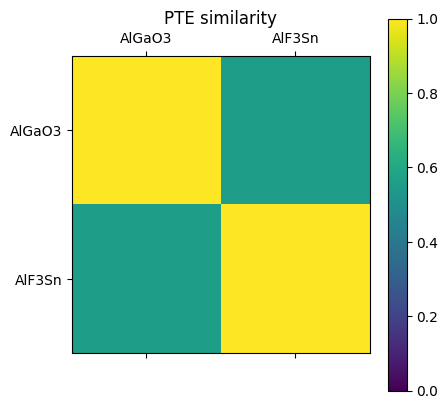
Reading the updated data works just as expected. Here, we generate a similarity matrix from the fingerprints that were stored in our backend and display it.
[29]:
similarity_matrix = db.get_similarity_matrix("PTE")
2024-06-14 14:13:41,394 - materials_database_log - INFO - Fingerprints with name "PTE" exist. Reading from database.
[30]:
import matplotlib.pyplot as plt
[31]:
plt.figure()
plt.matshow(similarity_matrix)
plt.xticks(range(len(db)), [entry.atoms.get_chemical_formula() for entry in db])
plt.yticks(range(len(db)), [entry.atoms.get_chemical_formula() for entry in db])
plt.title("PTE similarity")
plt.clim(0,1)
plt.colorbar()
plt.show()
<Figure size 640x480 with 0 Axes>